You search for your own service in your own city and a competitor sits in the top three spots on the map. You’re buried further down, or missing. Those three spots get a large share of the calls.
BitForward is a web design and software development studio based in Calgary, AB. This post covers what the map pack is, how Google picks who appears, and the seven steps I’d take, in order.
Key takeaways
- Step 1. Claim and verify your profile. Verifying it puts you in control of what Google shows.
- Step 2. Choose the right primary category. It tells Google which searches you're relevant for.
- Step 3. Keep your name, address and phone number consistent. Use the same details on your profile, site and directories.
- Step 4. List your services and write a clear description. Say what you do in plain words.
- Step 5. Earn reviews steadily. A regular flow of real reviews beats one big push.
- Step 6. Add real photos and post updates. They show a profile that is actively managed.
- Step 7. Make your website back up your profile. Clear service pages support what the listing says.
What is the Google map pack?
The map pack (also called the local pack or local 3-pack) is the block of three business listings with a map that appears near the top of Google results for local searches like “plumber in Calgary” or “dentist near me.”
Each listing shows the business name, star rating, review count, category, hours, and buttons to call or get directions. A searcher can contact you from there without ever opening your website.
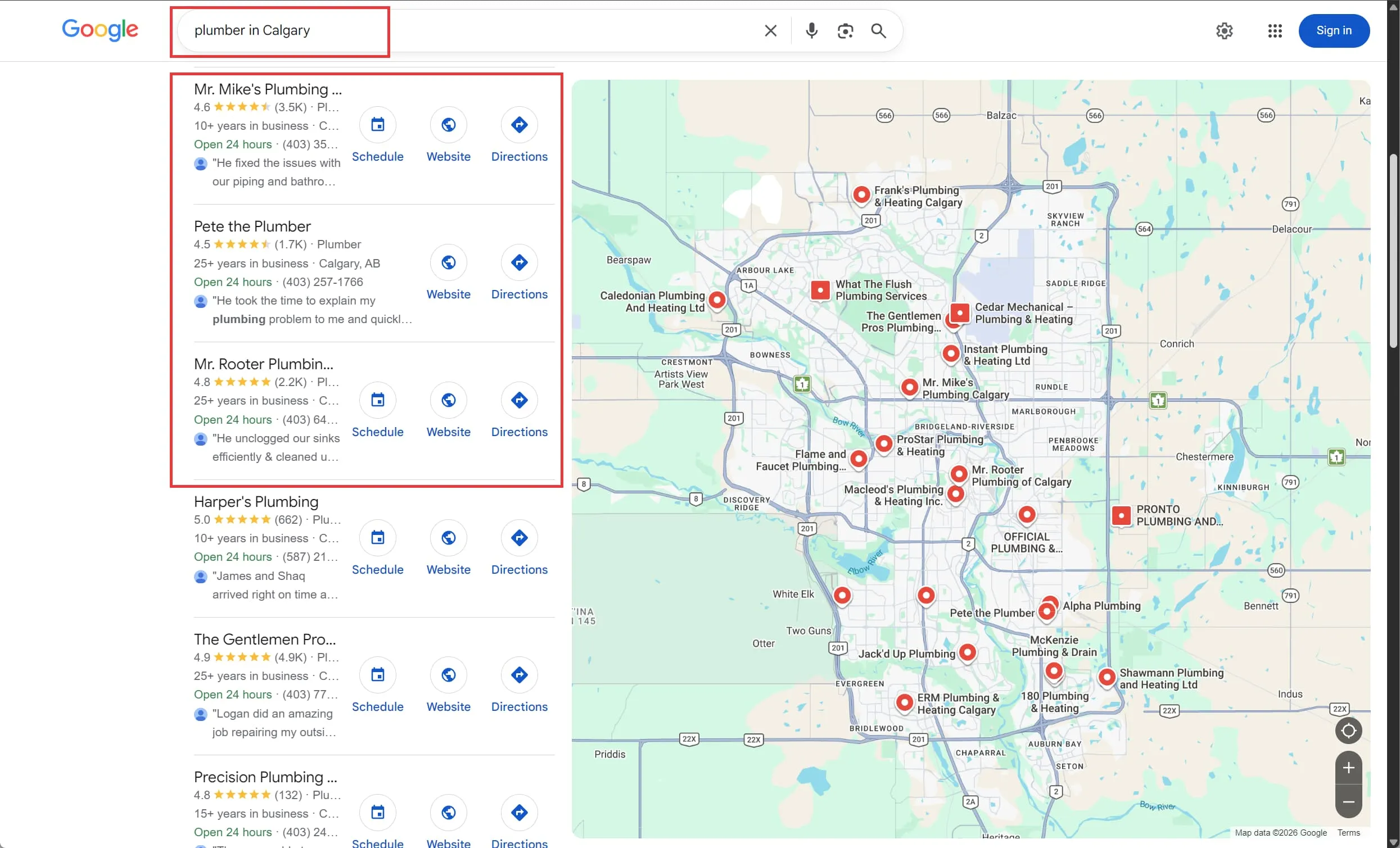
The red box above marks the three listings that make up the pack for a “plumber in Calgary” search. Everything below it is the next tier of results.
Not every search triggers one. Google shows it when it decides the searcher wants a nearby business. Searches for how-to information usually don’t.
How does Google decide who appears in the map pack?
Google says local results are based primarily on relevance, distance and prominence.[1] Each one works differently, and knowing which you can change saves a lot of wasted effort.
- Relevance. How well your profile matches what the person searched for. Your categories, services, description and the content of your website all feed this. You control it fully.
- Distance. How far your business is from the searcher, or from the location they typed in. You can’t move your address to suit every search, so this is the one you mostly can’t change.
- Prominence. How well known and trusted your business looks across the web. Google says this draws on links, articles and directories, and that review count and score also factor in.[1] You can build it, but it takes time.
Google also notes that your position in regular web results is a factor, so ordinary SEO on your website counts too.
One honest limit: if a competitor’s office is much closer to the searcher than yours, you may not beat them for that search, however well your profile is set up. The work below improves your odds. It doesn’t guarantee a spot.
How do you rank in the map pack? Seven steps
Step 1. Claim and verify your Google Business Profile
Everything starts here. If your profile isn’t claimed and verified, you can’t edit it and you won’t compete. Search for your business in Google Maps, claim the listing if one exists, or create one if it doesn’t.
Make sure you qualify. Google profiles are for businesses that meet customers in person, either at a location or by travelling to them. Don’t add a fake address to look closer. It’s a common reason profiles get suspended.
My full walk-through is in how to optimize your Google Business Profile.
Step 2. Choose the right primary category
Your primary category is one of the strongest relevance signals you control. It tells Google which searches you belong in.
Pick the category that describes your main service, not the broadest one. A business that does furnace repair and installation is better served by “HVAC contractor” than a vague “home improvement” label, if that’s the work it wants most. Add secondary categories only for services you really offer.
Step 3. Keep your name, address and phone number consistent
Your business name, address and phone number (often shortened to NAP) should match everywhere: your profile, your website, and directory listings.
Use the real name of your business, the one on your signage, invoices and website. Google’s guidelines say extra information in the name isn’t allowed and can lead to suspension.[2] That includes stuffing “Calgary Emergency Plumber” into a name that is just “Smith Plumbing.”
Small mismatches add up. “Suite 200” on one listing and “#200” on another isn’t a disaster, but a different phone number on an old directory can confuse both Google and customers.
Step 4. List your services and write a clear description
Fill in your services, service area and business description with the words customers actually use. Write for a person first. A plain sentence like “Furnace repair and installation for homes in Calgary and Airdrie” does more than a list of keywords.
Hours matter too. Keep them current, including holidays, because wrong hours are one of the quickest ways to lose a customer’s trust.
Step 5. Earn reviews steadily
Google lists review count and score among the things that affect local ranking.[1] Reviews also decide whether someone calls you or the business next to you, so they pull double duty.
The most reliable method is asking at the end of a good job, with a direct link to your review page. Reply to every review, good or bad, in a calm and specific way. I cover the whole process in how to get more Google reviews.
Don’t buy reviews or offer rewards for them. Google can remove them, and it puts the profile at risk.
Step 6. Add real photos and post updates
Photos of your actual work, team, vehicles and premises help customers decide and show that the profile is looked after. Skip generic stock images, since people spot them quickly.
Posts and updates are optional, but a profile with recent activity looks more reliable to customers than one that hasn’t changed in two years. Keep it light: a finished job, a seasonal reminder, a change in hours.
Step 7. Make sure your website backs up your profile
Your profile gets you into the map pack. Your website helps Google trust what the profile says, and it’s where many visitors go to decide.
Here’s what to check:
- Service pages. Each main service should have its own page that says plainly what you do and where. A single “Services” page with one line each gives Google and customers very little.
- Location signals. Mention the areas you serve in natural language on the pages that matter, and put your address and phone number in the footer or contact page, matching your profile exactly.
- Speed and mobile. Most local searches happen on phones. A page that loads slowly or has a tiny tap target for the phone number loses the call you just earned.
- A clear next step. If a visitor clicks from your profile and can’t find how to book, the ranking work was wasted.
If your site needs work on any of this, my web design for Calgary businesses page explains how I build sites for local service companies. The wider picture is in local SEO for Canadian service businesses.
How long does it take to rank in the map pack?
It depends on how competitive your category and city are, and how complete your profile is when you start. A new profile in a quiet category can move in weeks. A busy category like plumbing or dentistry in a large city usually takes months of steady reviews and consistent activity.
I won’t promise a timeline, because nobody outside Google can. What I can say is that the businesses that stay in the top three are usually the ones that keep going after the initial setup.
What mistakes keep businesses out of the map pack?
- Incomplete profiles. Missing categories, services or hours leave Google guessing about what you do.
- Wrong or too many categories. Adding categories you don’t really serve dilutes the signal for the ones you do.
- Keyword-stuffed names. It can get the profile suspended, and it undermines the trust you’re trying to build.
- No review habit. A burst of reviews and then silence looks less trustworthy than a steady trickle.
- A website that doesn’t match. Different phone numbers, no service pages, or a slow mobile site weakens everything above it.
If you only have an hour, check your primary category and your hours, then send review requests to your last five happy customers. Those two things move the needle more than any trick.
Once your profile is in good shape, it’s worth checking whether ChatGPT, Gemini and Claude recommend your business too.
Frequently asked questions
Can I pay to be in the Google map pack? No. The map pack is organic. Google’s ads appear separately and are labelled as “Sponsored”. Ranking in the pack comes from relevance, distance and prominence.
Do I need a website to rank in the map pack? You can appear without one, but it’s harder to compete. Google counts your website position as part of local ranking,[1] and most customers want more detail than a profile gives.
Can I rank if I work from home? Often yes, if you serve customers in person or travel to them. You can hide your home address and set a service area instead. Follow Google’s guidelines on what counts as a valid business.
Why does my ranking change depending on where I search? Because distance is one of the factors. Someone searching from across town sees a different order than someone standing next to your shop.
Is it worth hiring someone to do this? Steps 1 to 6 are things most owners can do themselves in a few hours, then maintain a little each month. Help is worth it for the website side, or if your profile has been suspended.
Final thoughts
Get the basics right: a complete profile, the right category and a steady trickle of real reviews. Of Google’s three factors, relevance, distance and prominence, you can influence two.
BitForward is a web design and software development studio based in Calgary, AB. For a second opinion on how your website supports your local rankings, request a free website audit.